
Tayori (便り, "news, a letter from someone") is product news for Phoenix: what your app has to say to its people. It starts with the changelog. It gives your app:
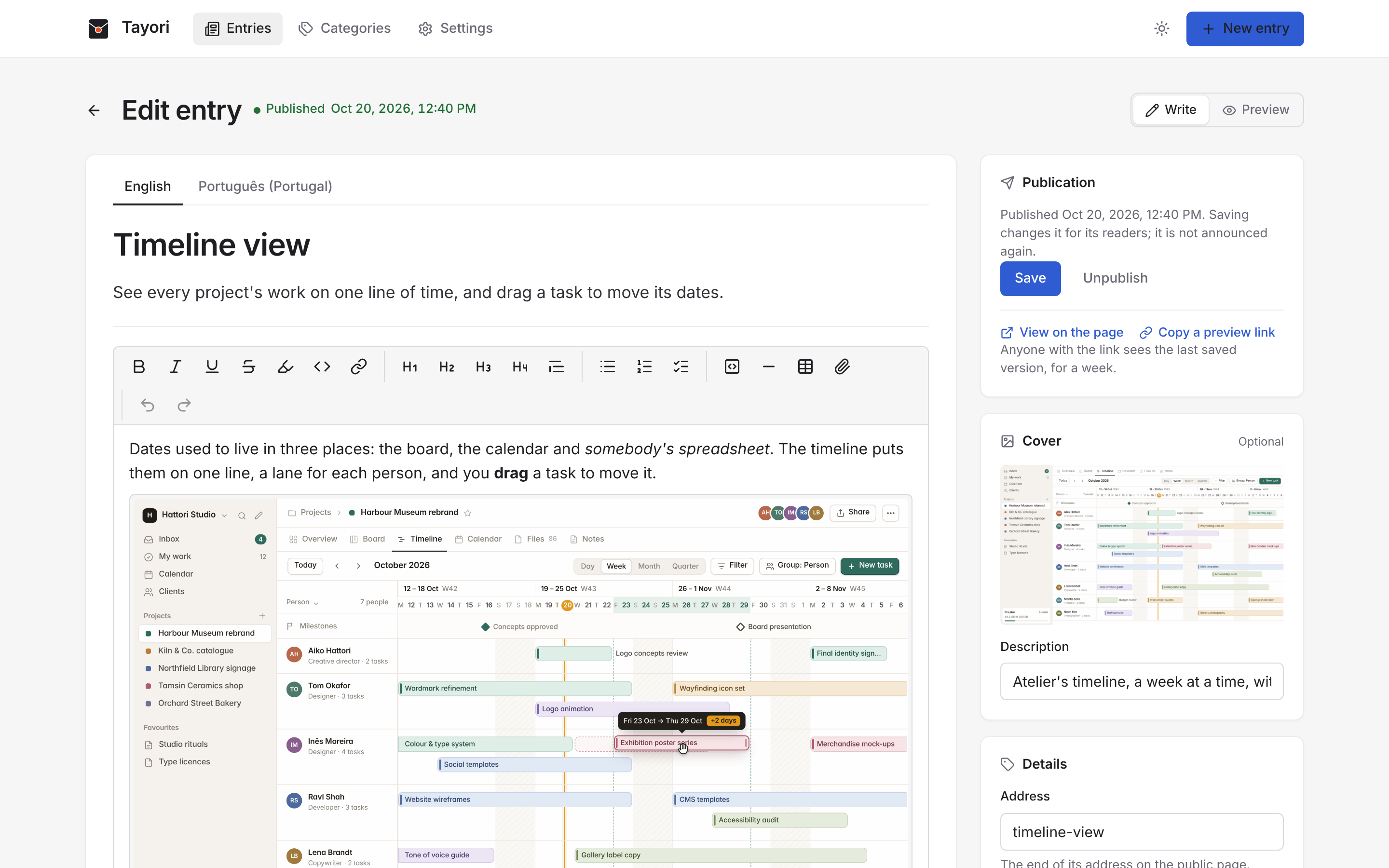
- an admin, mounted in your router behind your own admin pipeline, to write the news: each entry in Kotoba's editor, with images, videos and files, in each of your languages, published now or at a time picked with Koyomi;
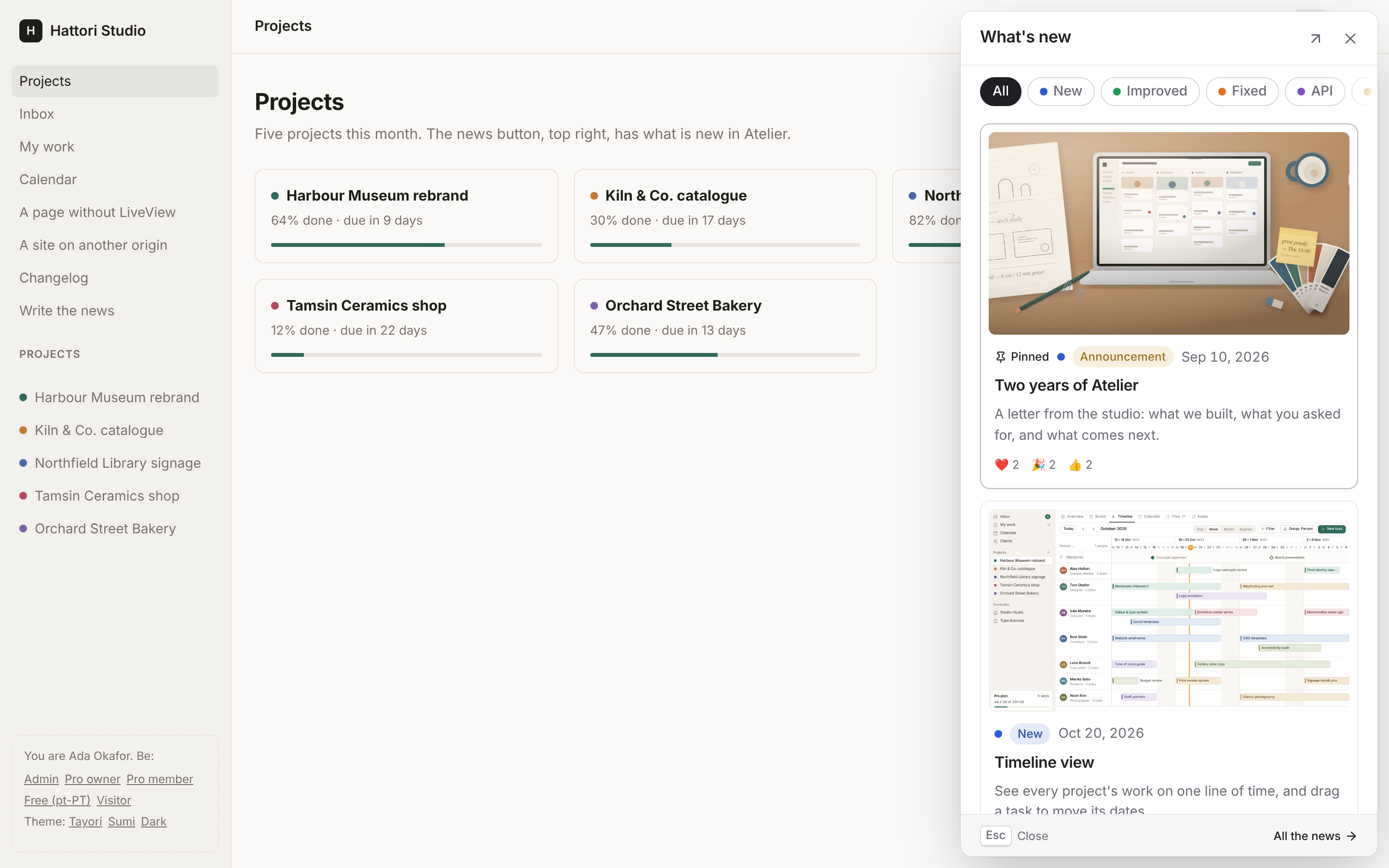
- the news in your LiveViews: a button with the count of what each person has not seen, and a panel of the news, live as entries are published;
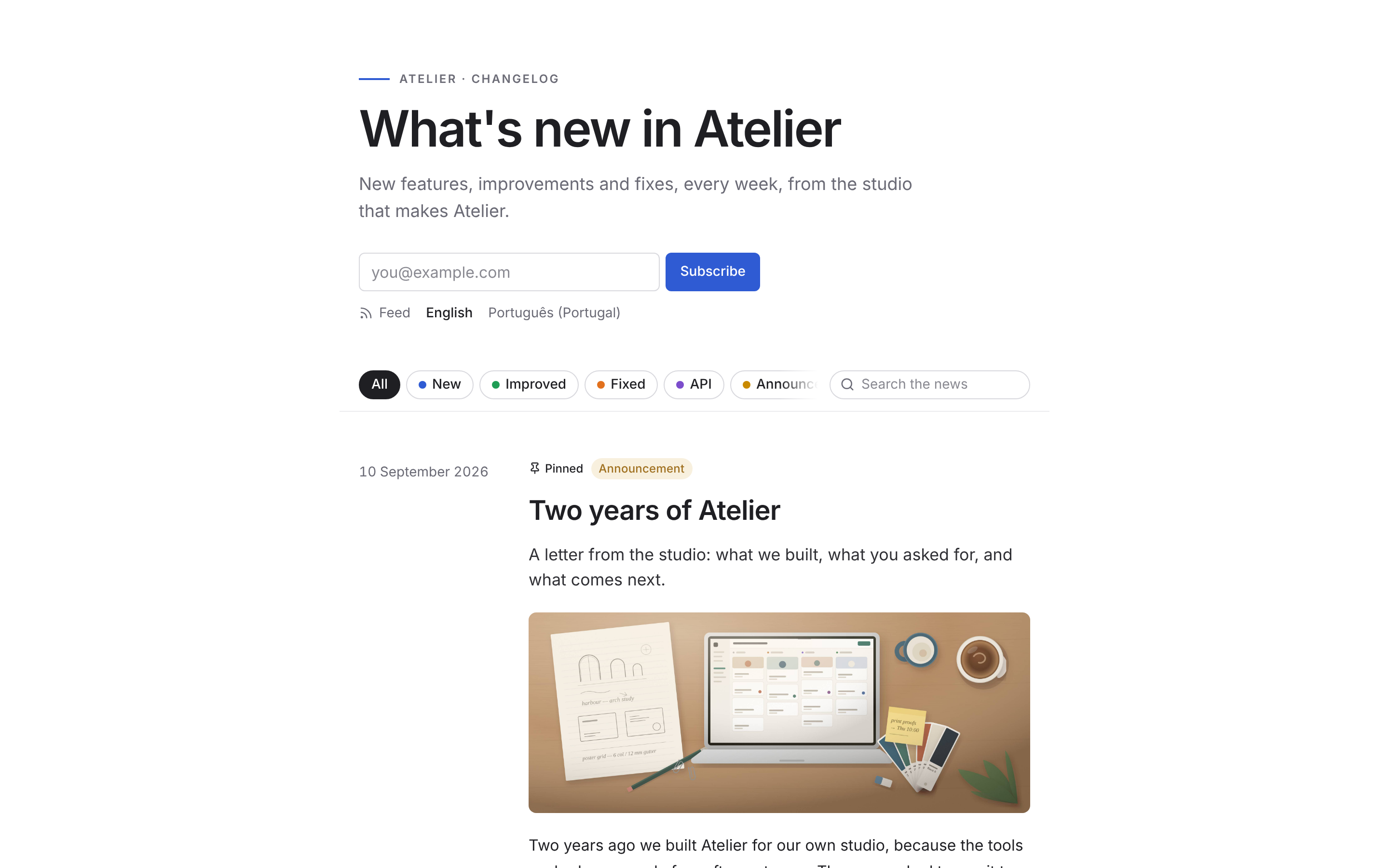
<tayori-news>and a JSON API, for a frontend that Phoenix does not render (React, Vue, Svelte, a mobile app), and for a site on another origin, with a token your server signs for the reader;- a public page of the news, a page for each entry, and Atom and JSON feeds;
- segments: an entry for everyone, or for the readers your app says it is for (a plan, a role, a team), from the users it already has, with no data sent anywhere;
- drafts with AI, with your own key: an entry from what shipped, a translation, a passage rewritten, streamed into the editor for you to accept;
Tayori.Notifier, to send an entry by email (or to Slack) when it is published, through your own mailer;Tayori.Test, to publish entries and read the news inPhoenix.LiveViewTestwith no browser.
The admin is a page of its own, with its own script and styles, so it looks the same in any app. The news in your app is a prebuilt JavaScript bundle in the Hex package: your app does not run Node.js for it, you add the hook and one style sheet.
What Tayori does
| Entries | a title, a summary, a body in Kotoba (headings, lists, links, code, tables, images, videos, files), a cover, categories, a slug; drafts, scheduled, published, unpublished; pinned |
| Languages | each entry in each of your languages, the first required; each reader gets theirs, else the first |
| Admin | mounted with tayori_admin, behind your pipeline; your resolver says who the admin is and what they may do (all, read only, nothing); a list with tabs, a search and each entry's numbers; a preview as the page, the panel or the announcement; categories; live as other admins write |
| Publishing | now, or at a time in the admin's own time zone; each entry announced once, on one node of a cluster, to every open page, the subscribers, the webhooks and your notifier; as Oban jobs, retried through deploys, when your app has Oban |
| Extras | yours to turn on: reactions, announcements, analytics, email subscriptions, webhooks and Slack and Discord, the embed |
| Readers | Tayori.Reader, built by your resolver from your own user: an id, segments, a language, the time they joined |
| In the app | a button with the count of unread entries, a panel with category filters, cards and each entry whole inside it; announcements as a popup, a toast or a banner; live over PubSub, and across tabs |
| Any frontend | a JSON API (tayori_api) and <tayori-news>, the same button, panel and announcement; on another origin with the :embed feature: CORS for your sites and a signed reader token |
| Public page | tayori_page: the news for everyone, with filters, a search, pinned entries and email subscriptions; a page for each entry with previous and next; Atom and JSON Feed; shared-link cards, JSON-LD and a sitemap; in the reader's language |
| Automation | an inbox of what shipped: your CHANGELOG.md and fragments at each deploy, CI with a token, GitHub's merged pull requests and releases, your code; the team's changes kept out; digests, plain or by the model, when you ask, as changes come, or each week or month; drafts or published; emails each entry or once a period |
| MCP | Tayori.MCP, mounted with Sake beside your app's other servers: an agent reads the news and the inbox, drafts and writes entries with screenshots, and publishes when asked |
| AI | any model of ReqLLM with your key, kept encrypted; draft, translate, rewrite, shorter, warmer, fix the spelling; suggestions you accept or reject |
| Words | eight languages (Tayori.Messages), your own in the config |
| Database | PostgreSQL and SQLite, in a migration of your app (Tayori.Migrations) |
| Theming | CSS custom properties, light and dark, the Sumi theme, forced colours, reduced motion; the admin in Tayori's theme or Sumi's |
Install
Tayori needs Elixir 1.18 or later (it uses the built-in JSON module),
Phoenix 1.7.14 or 1.8, Phoenix LiveView 1.1 or later, and Ecto with
PostgreSQL or SQLite.
With Igniter:
mix igniter.install tayori
mix ecto.migrate
The installer adds the dependency, mounts the admin at /admin/news and
the public page at /changelog, writes the migration of Tayori's tables,
adds the hook to assets/js/app.js and the style sheets to
assets/css/app.css, starts Tayori in your application, and writes
lib/my_app_web/tayori_resolver.ex, which lets no one in the admin until
you say who your admins are. It shows each change as a diff before it
writes, and running it again changes nothing.
Without Igniter, add {:tayori, "~> 0.1"} (and {:req_llm, "~> 1.6"}
for AI) to your deps, and Tayori to your supervision tree, after the repo
and the PubSub:
{Tayori,
 repo: MyApp.Repo,
 pubsub: MyApp.PubSub,
 secret_key_base: Application.fetch_env!(:my_app, MyAppWeb.Endpoint)[:secret_key_base],
 locales: ["en", "pt-PT"]}
The Quickstart goes through it all, with the manual steps.
Use
Mount the admin behind your admin pipeline, and the public page:
import Tayori.Router

scope "/admin" do
  pipe_through [:browser, :require_admin]
  tayori_admin "/news", resolver: MyAppWeb.TayoriResolver
end

scope "/" do
  pipe_through :browser
  tayori_page "/changelog", title: "What's new in MyApp"
end
Say who your admins and your readers are:
defmodule MyAppWeb.TayoriResolver do
  @behaviour Tayori.Resolver

  @impl true
  def resolve_user(conn), do: conn.assigns[:current_admin]

  @impl true
  def resolve_access(%MyApp.Admin{}), do: :all
  def resolve_access(_nobody), do: {:forbidden, "/admin/login"}

  @impl true
  def segments, do: [{"Plan", [{"plan:free", "Free"}, {"plan:pro", "Pro"}]}]

  @impl true
  def resolve_reader(%{assigns: %{current_scope: %{user: %{} = user}}}) do
    %Tayori.Reader{id: "user:#{user.id}", segments: ["plan:#{user.plan}"], locale: user.locale, since: user.inserted_at}
  end

  def resolve_reader(_visitor), do: nil
end
And put the news in your LiveViews: the hook in the live_session, after
your own, and the button and the panel in the layout:
live_session :app,
  on_mount: [{MyAppWeb.UserAuth, :require_authenticated}, {Tayori.Live, resolver: MyAppWeb.TayoriResolver, page: "/changelog"}] do
  ...
end
<Tayori.Components.news_button tayori={@tayori} />
<Tayori.Components.news_panel tayori={@tayori} />For a frontend that Phoenix does not render, mount tayori_api and use
<tayori-news api="/api/news"> (see Any frontend).
Guides
- Quickstart: from the dependency to the first entry your readers see.
- The admin: mounting it behind your authentication, access, segments, attachments, the CSP.
- Readers: the resolver, segments, languages, what is unread.
- In the app: the news in your LiveViews.
- Any frontend: the JSON API and
<tayori-news>. - The public page: the page, each entry's page, the feeds.
- Features: categories, covers, pinned entries, and the extras you turn on: reactions, announcements, analytics, email subscriptions, webhooks, the embed.
- Writing with AI: the model, the key, drafts, translations, rewrites.
- Automation: the inbox, its sources, CI and GitHub, digests, their cadence, the emails.
- MCP: the news and the inbox for an agent, with Sake; screenshots in entries.
- Notifications: what a publication sends, with Oban or not.
- Testing:
Tayori.Test. - Theming: the properties, dark mode, the Sumi theme.
- Known limits.
Development
The scripts of the news and of the admin are TypeScript in assets/. The
built files in priv/static are not in the repository; the Hex package
has them.
mix deps.get
mix dev
mix dev builds the bundles when they are missing (mix tayori.build),
and starts a development server at http://localhost:4099: Atelier, a
small app with its news, the admin at /admin/news (and in Sumi at
/sumi/news), a LiveView page and a plain page with the news, and the
public page at /changelog. ?as= chooses who you are: admin,
viewer, pro, free or visitor. The scripts rebuild as you change
them.
Tests
mix test                    # on SQLite, and PostgreSQL when it is reachable
mix test --include build    # with the built bundles (after mix tayori.build)
mix test.js                 # the scripts' unit tests
mix test.e2e                # the browser tests (Playwright)
mix precommit
mix dialyzer
The browser tests need their browsers once:
cd e2e && npm ci && npx playwright install chromium firefox webkit.
Release
mix release (in this repository, an alias that replaces Mix's
release task) builds the bundles, checks priv/static, publishes to
Hex, and tags and pushes v<version>.
Contributing
See CONTRIBUTING.md: when a change needs an issue first, and what a pull request needs. Report a security problem privately, as SECURITY.md says.
License
MIT, see LICENSE. The admin's script has Phoenix, Phoenix LiveView,
Kotoba (with Lexical) and Koyomi in it. Tayori's icons are hand-picked from
Lucide (ISC, some from Feather, MIT), and the Sumi
theme carries the Outfit and Cormorant Garamond typefaces (SIL Open Font
License). Their licences are in NOTICE.